The internet has changed how people discover websites, profiles, communities, and classified listings. With a few clicks, you can find information from almost anywhere. But there is an important question that many users forget to ask: Can you trust the profile you are looking at?
A professional photograph, attractive description, or friendly conversation does not automatically mean an online profile is genuine. Fake identities, copied photographs, misleading information, phishing attempts, and payment scams can appear on many types of websites.
Whether you are browsing MissKokka or reading online safety information through MissKokka Blogs, developing good verification habits is one of the simplest ways to improve your online experience.
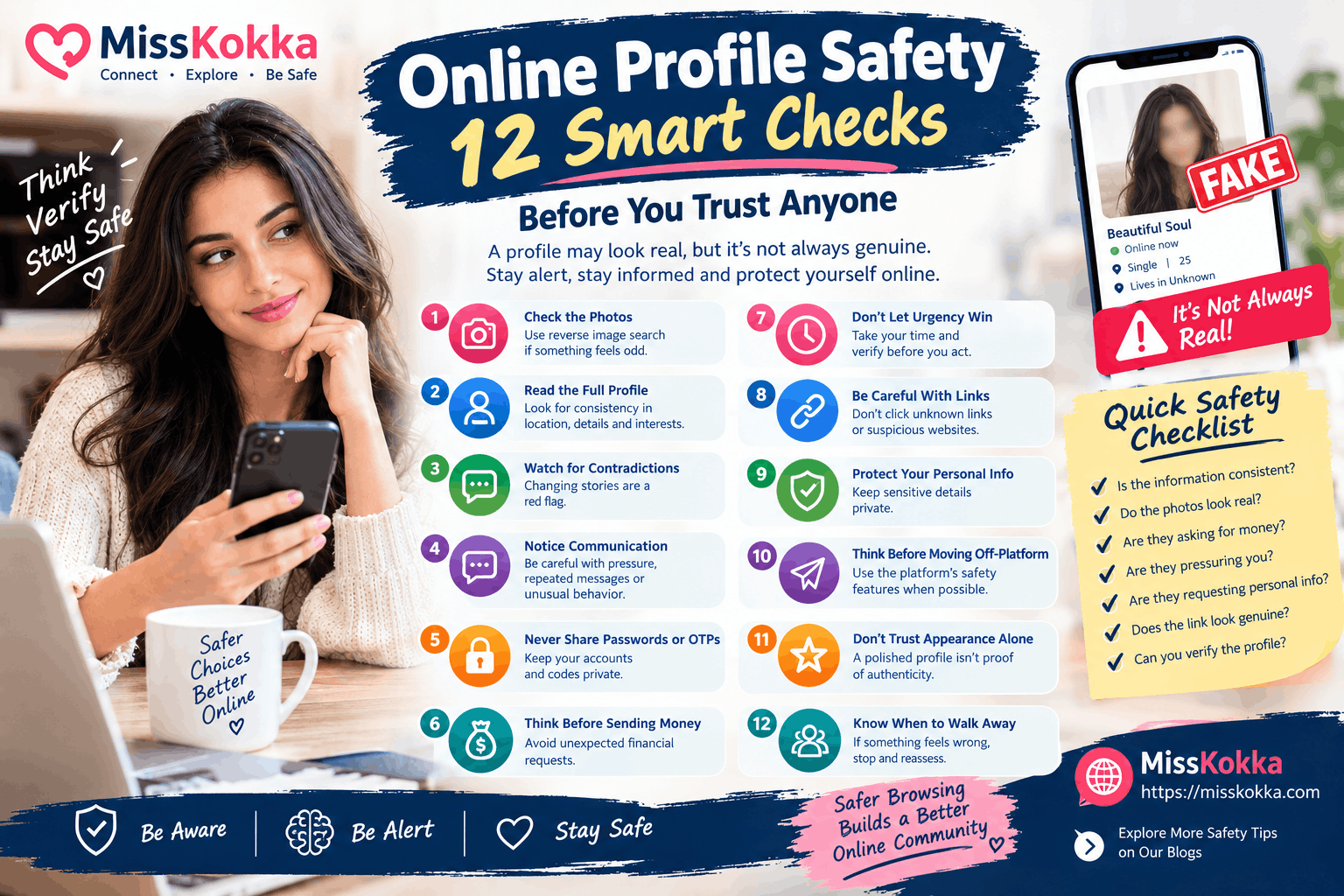
Here are 12 practical checks worth knowing before you place trust in an unfamiliar online profile.
1. Look Beyond the Profile Photograph
A photograph is often the first thing people notice, but it is not proof of identity.
Images can be copied from public social-media accounts, websites, or other profiles. Some scammers deliberately use attractive photographs because they know users are more likely to trust a profile that looks polished.
If something seems unusual, consider checking whether the photograph appears elsewhere online.
The important point is simple: a real photograph does not necessarily mean a real profile.
2. Read the Entire Profile
Don't judge an account from its photograph alone.
Read the description carefully and look for information that appears inconsistent or unusually generic.
Ask yourself:
-
Does the description make sense?
-
Does the location appear consistent?
-
Does the information change from one section to another?
-
Does the profile look copied?
-
Are important details missing?
A new or short profile is not automatically fake. The goal is to identify combinations of warning signs.
3. Watch for Contradictions
Small mistakes happen online. People can make typing errors, forget details, or update information.
Repeated contradictions are different.
If someone provides different locations, ages, occupations, names, or stories during the same interaction, take a step back.
You don't need to accuse anyone. Simply slow down and avoid making decisions based on information you cannot verify.
4. Pay Attention to How Someone Communicates
Communication patterns can provide useful clues.
Be cautious when an unfamiliar profile:
-
Repeats the same message
-
Avoids straightforward questions
-
Changes its story frequently
-
Immediately creates emotional pressure
-
Pushes you toward another website
-
Requests sensitive information
-
Suddenly introduces a financial problem
One unusual message is not enough to determine that an account is fraudulent. Several patterns together deserve attention.
5. Never Share Passwords or OTPs
This rule should never be ignored.
Your password, one-time password, recovery code, and authentication details are private.
If somebody asks you to provide an OTP "for verification," stop and investigate what is actually happening.
Legitimate account security processes should not require you to hand your private authentication codes to another person.
6. Be Extremely Careful With Money
Unexpected financial requests are one of the biggest online warning signs.
Someone you have never met may claim they need money because of:
-
An emergency
-
Travel problems
-
Account verification
-
A temporary fee
-
A refund
-
A booking
-
A technical issue
-
A supposed security deposit
Do not allow an emotional story or urgent deadline to make the decision for you.
If money is involved, verify independently before doing anything.
7. Don't Let Urgency Make the Decision
"Do it now."
"Only a few minutes left."
"Send the payment immediately."
These types of messages are designed to reduce the time available for careful thinking.
A useful safety habit is to pause whenever someone creates unnecessary urgency.
Take a few minutes to verify the information, check the website, and think about what you are being asked to do.
8. Be Careful With Links
Unknown links can lead to phishing websites, fraudulent payment pages, fake login screens, or other harmful destinations.
Before clicking an unexpected link, consider whether:
-
You recognize the website
-
You expected the message
-
The domain appears correct
-
The sender is trustworthy
-
The page is asking for sensitive information
Never enter your password or financial information into a website simply because someone sent you a link.
9. Protect Your Real-World Information
Online privacy is not only about passwords.
Information such as your home address, workplace, daily routine, financial details, identification documents, and private photographs can also create risks when shared with strangers.
Before sharing anything, ask:
Does this person actually need to know this?
If the answer is no, keeping the information private is usually the safer choice.
10. Be Careful When Moving to Another Platform
People often communicate across multiple apps and websites, so moving a conversation elsewhere isn't automatically suspicious.
However, be more cautious if someone insists that you immediately leave the original platform and then starts asking for money, personal information, or unusual actions.
Whenever possible, use the original platform's safety, blocking, and reporting features while you are still evaluating an unfamiliar profile.
11. Don't Trust a Profile Because It Looks Professional
Scammers understand how websites work.
A fake account can have:
-
High-quality photographs
-
A detailed biography
-
Multiple images
-
Professional-looking messages
-
Social-media links
-
A convincing username
A polished appearance can make an account look trustworthy, but appearance is not verification.
Always evaluate behavior and consistency as well.
12. Know When to Walk Away
One of the most valuable online safety skills is knowing when to stop.
You do not need to prove that someone is a scammer before ending a conversation.
If you feel uncomfortable, notice repeated contradictions, receive suspicious payment requests, or believe someone is trying to obtain sensitive information, you can simply stop responding.
Use blocking and reporting features when appropriate.
Your safety is more important than winning an argument with an unknown person online.
The 30-Second Profile Check
Before continuing with an unfamiliar profile, take 30 seconds and ask yourself five questions:
Who is this person?
Do I have a reasonable basis for believing the information is genuine?
What are they asking from me?
Are they simply communicating, or are they requesting money, personal information, or access?
Why are they creating urgency?
Is there a genuine reason I must act immediately?
Can I verify the information independently?
Can I check the profile, website, photograph, or claim without relying solely on what the person says?
Do I feel comfortable continuing?
If something doesn't feel right, there is no need to rush.
What Makes an Online Profile More Trustworthy?
There is no universal test that can guarantee an online profile is genuine.
However, responsible profiles generally demonstrate greater consistency.
Useful positive indicators can include:
-
Consistent information
-
Normal communication
-
Transparent profile details
-
No unexplained financial pressure
-
Respect for privacy
-
No demand for passwords or OTPs
-
Willingness to use legitimate platform features
-
No suspicious links or unusual requests
Even these indicators are not absolute proof. Online safety is about reducing risk, not achieving perfect certainty.
What To Do When You Find a Suspicious Profile
If you believe a profile may violate platform rules or attempt to scam users, don't try to expose or confront the person yourself.
Instead:
Stop sharing information
Don't provide additional personal or financial details.
Don't send money
Avoid making payments while the situation is uncertain.
Save relevant evidence
Keep appropriate screenshots, messages, transaction details, or profile information if you need to report the account.
Block the account
Use the available blocking tools when appropriate.
Report the account
Use the platform's official reporting process and provide accurate information.
What If You Already Shared Personal Information?
Don't panic.
The correct response depends on what information was shared.
If you shared a password, change it immediately and make sure the same password isn't being used elsewhere.
If financial information was exposed, contact your bank or payment provider and ask about appropriate protective measures.
If you shared an identification document, monitor for suspicious activity and consider contacting the relevant authority or service provider for guidance.
If you clicked a suspicious link, avoid entering additional information and review your account security.
Acting quickly can reduce potential damage.
Why Online Safety Content Matters
Online safety is not just about avoiding scams.
It also means creating a healthier digital environment where people understand privacy, responsible communication, profile verification, and respectful behavior.
Websites such as MissKokka Blogs can use educational content to help visitors understand these issues before they interact with unfamiliar online profiles.
The more people understand common warning signs, the easier it becomes to recognize suspicious behavior early.
Frequently Asked Questions
How do I know whether an online profile is genuine?
There is no single test that guarantees authenticity. Check the consistency of the profile, photographs, communication, and requests, and be especially cautious about money or sensitive information.
Can a fake profile use real photographs?
Yes. Publicly available photographs can be copied and used on another account.
Should I trust a profile with many photographs?
Not automatically. Multiple photographs can make an account look convincing, but they do not independently verify identity.
What is the biggest warning sign of an online scam?
Unexpected requests for money or sensitive information combined with urgency and pressure are major warning signs.
Should I share my OTP with someone who says they need it for verification?
No. Keep OTPs and authentication codes private.
What should I do if someone sends me a suspicious link?
Don't open it if you are unsure. Verify the website independently instead of relying on the link provided by the sender.
Is it safe to share my home address online?
Avoid sharing your exact home address with unfamiliar people unless there is a legitimate and verified reason to do so.
Should I confront a suspicious profile?
Usually, no. Stop communicating, use blocking tools, and report the account through the appropriate platform.
Can a professional-looking profile still be fraudulent?
Yes. Appearance and polished content do not guarantee authenticity.
What should I do if I think I have been scammed?
Stop further communication or payments, preserve relevant evidence, contact your bank or payment provider if money is involved, secure compromised accounts, and report the incident through appropriate channels.
Final Takeaway
The smartest online users are not necessarily the ones who know every type of scam. They are the ones who know when to slow down.
Before trusting an unfamiliar profile, check the information, examine the photographs, protect your private details, avoid unexpected payments, question urgency, and use the safety tools available on the platform.
And remember one simple rule:
If someone wants your money, password, OTP, or sensitive information, verify first and trust later.
For more practical articles about online profiles, privacy, and safer digital interactions, explore MissKokka Blogs.


.png)